
App walkthrough demo
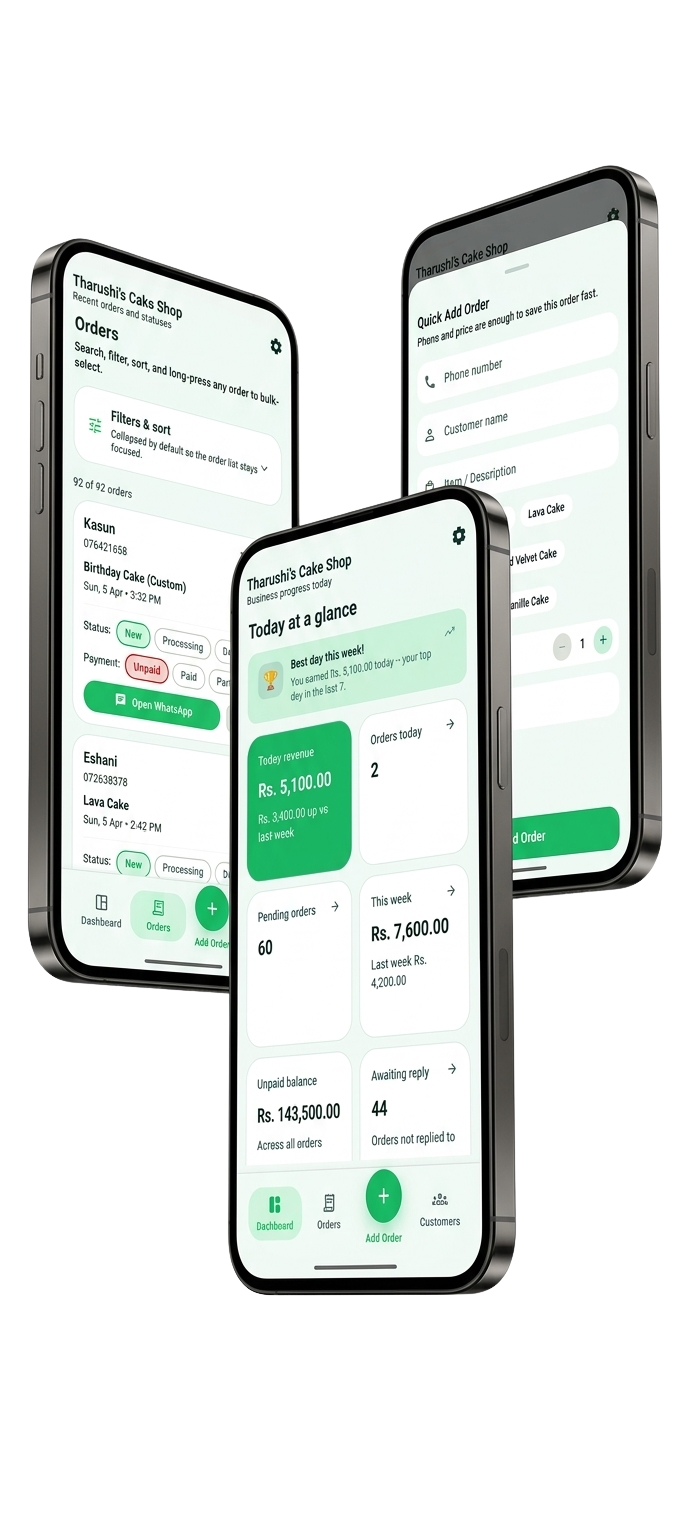
A quick tour of the main Orderly screens so customers can see how the app works at a glance.
A simple order tracker for independent sellers and small businesses
Keep orders and customers organized, track payments, and share receipts — even when you are offline.
Built for the way owner-run sellers actually work
The old system
Most independent sellers start here. It works until the business gets busy.
The panic search
A customer calls and you spend minutes digging through chats to find the order, price, or delivery note.
Invisible debt
Someone said they would pay later, but you are not sure how much is still outstanding or when it was promised.
The lost notebook
A message thread disappears, a note goes missing, or a phone gets replaced and the order record goes with it.
No idea what's making money
You are busy every day but still cannot answer which products, services, or customers are driving revenue.
Every order, customer, payment, and receipt stays organized in one place so you can work faster without carrying the whole business in your head.
Small change. Big difference.
Find an order
Scroll, scroll, scroll… which customer was it?
Search a name or order ID and open the right record.
Track payments
I think she paid the advance? Let me check bank SMS…
Clear PARTIAL badge with exact balance. Always visible.
Daily deadlines
Phone alarms, sticky notes, and a wall calendar.
Filter by Today's deliveries. Your whole day in one view.
Order records
I lost my book. I deleted the message thread.
Offline access, with cloud sync included in Pro when connected.
Business growth
"I think I'm doing okay?" (no real numbers)
30-day revenue, top products, best customers. Real data.
Looking professional
A voice note reply: "yeah your order is coming"
Branded PDF receipt. Preview it and share it from your phone.
Multi-item orders
One giant notes field: "3 cakes, 2 shirts size L, 1 sarong…"
Separate line items with quantity, unit, and price each. Running total updates live.
Scroll, scroll, scroll… which customer was it?
Search a name or order ID and open the right record.
I think she paid the advance? Let me check bank SMS…
Clear PARTIAL badge with exact balance. Always visible.
Phone alarms, sticky notes, and a wall calendar.
Filter by Today's deliveries. Your whole day in one view.
I lost my book. I deleted the message thread.
Offline access, with cloud sync included in Pro when connected.
"I think I'm doing okay?" (no real numbers)
30-day revenue, top products, best customers. Real data.
A voice note reply: "yeah your order is coming"
Branded PDF receipt. Preview it and share it from your phone.
One giant notes field: "3 cakes, 2 shirts size L, 1 sarong…"
Separate line items with quantity, unit, and price each. Running total updates live.
A quick tour of the main Orderly screens so customers can see how the app works at a glance.
Shows the full flow from adding a new order to sharing the receipt with the customer.
Let Orderly handle the remembering.
Answer any customer in seconds
Search by customer name, phone number, or order ID and get the answer fast instead of digging through messages.
Never let a payment slip again
Track deposits, partial payments, remaining balance, and payment method so every order stays financially clear.
Know who your real customers are
Keep customer history, repeat purchases, unpaid balances, and notes together so follow-up feels easy.
Works even when the internet doesn't
Create and update orders offline, then let everything sync when the connection comes back.
Find out what's actually making money
See what is selling, what is slowing down, and how your business is performing without building spreadsheets.
Professional receipts in a tap
Create polished PDF receipts, preview them first, and share them through the apps already on your phone.
Plan your day clearly
Use due-date filters to spot what needs attention today, this week, or next before messages pile up.
Multi-item orders stay organized
Add each item with its own quantity, unit, notes, and price while the total updates automatically.
Coming in Orderly 1.14.0
These updates are being prepared for the next mobile release. Check your store listing for availability.
Account & Security
See your sign-in provider and manage a separate contact email.
Your own accent color
Personalize the app independently of receipt branding.
Full Orderly backup
Export a .orderly file and restore supported orders, customers, business settings, and preferences.
More language choices
Use System default, English, Sinhala, Tamil, Spanish, or Brazilian Portuguese.
Dashboard
Quick Add Order (Multi-item)
Orders List
Customers
Receipt Preview
Receipt Branding Settings
Data Control & Sync
Real situations. Real relief.
Morning
Plan your day before the messages pile up
The situation
“You open Orderly while your first coffee is still warm.”
What you do
Filter by orders due today and check who still owes a balance.
The result
Your deliveries, pickups, and follow-ups are already clear before the day gets noisy.
Midday
Turn a messy message into a clean order
The situation
“A customer sends several items, special notes, a delivery request, and a deposit update in one long message.”
What you do
Create the order, add each item separately, save the payment, and attach the delivery note immediately.
The result
The chaos becomes a structured order with nothing left to remember later.
Afternoon
Handle live changes without panic
The situation
“A customer calls while you are already in the middle of other work and wants to update the order.”
What you do
Open their history, adjust the order, and save the change while you are still on the call.
The result
No forgotten updates, no second-guessing, and no need to rely on memory after the conversation ends.
Month-end
See what is working
The situation
“You want to know which work is bringing in revenue and which products are slowing down.”
What you do
Open the dashboard and review recent sales, receipts, and customer activity.
The result
You get a clearer picture of business performance without waiting to build a spreadsheet first.
Simple pricing
Try Orderly with your first 20 orders, then unlock unlimited orders with one payment.
Free Trial
Explore the app before you buy. Your existing data stays readable after the trial limit; Pro lets you create more orders.
Orderly Pro Lifetime
One-time payment. No subscription.
Unlock unlimited orders with a single payment. Cloud backup and sync are included.
Apple or Google shows the final checkout amount in your store currency, including applicable taxes.
Download Orderly


Everything important about the trial, lifetime unlock, and store checkout.
iOS and Android live
Start with the live iOS or Android app today. If you also want release notes, major feature updates, or product announcements, leave your email below.
Install the live mobile app
Orderly is available on the App Store and Google Play, so new customers can begin the 20-order free trial right away.
Get product updates by email
Use the signup form for release notes, feature announcements, and important product news.
See what Orderly can do
Explore order tracking, receipts, customer history, and business insights on this site.
Download
Start with Google Play or the App Store, then use email for updates.
Email updates
Add your email and we'll send the important stuff only: major feature launches, release notes, and important product updates.
Stay synced
The app is live in both official stores, and the email list is only there for release notes and important product news.
Start using Orderly today
Install from Google Play or the App Store and begin the 20-order free trial immediately.
Only relevant updates later
We keep email focused on release notes, major features, and important product updates.
Need help setting up, paying, or anything else? Email our support team.